Roumazeilles.net

Archive for July, 2009


UltraSurf: Internet privacy for the masses

(Wednesday, July 29th, 2009)

UltraSurf

Just a short notice. I discovered a very simple and relatively powerful Internet privacy solution, Ultrasurf, for those of us who may be interested in browsing the Internet in near complete anonymity: hide IP addresses and locations, clean browsing history, cookies & more …

It may be the future of Internet privacy.

Bought a new lens converter

(Wednesday, July 29th, 2009)

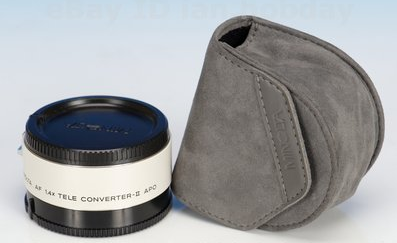
I’m just out of eBay where I bought a second-hand Minolta 1.4x lens converter to extend a little my tele-lenses when I put them on my Sony Alpha 700 and the old faithful Konica-Minolta Dynax Maxxum 7D.

minolta_converter

I think it is going to support me when I go to Nepal (Bardia National Park) in next October. With Alain Pons and Amawanda.

What is the best SSD drive today?

(Monday, July 27th, 2009 by Yves)

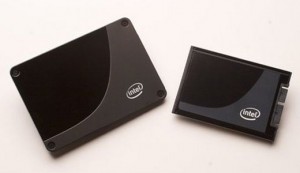
Intel X25-M

Intel X25-M

SSD drives are those disk drives that are not using rotating platters with data stored magnetically, but that are based upon a set Flash memory components (so, without any mobile part, and with a performance that has nothing to do with even the fastest magnetic hard disk drives). SSD drives are expensive but, with costs are plummeting, the most expert and demanding users are starting to look at them dreamingly.

But everything shows that the SSD drives are not all equal (there is still an intense competition at this apex of performance). We see many a product recommended, often without all the technical arguments.

The “A look at SSD performance in Windows Vista – The more things change…” article from Geoff Gasior (The Tech Report) is definitely full of little gems because of that: It comes after a large number of tests (and many articles on the same subject) and compares finely the most representative products of the market.

Intel is presenting new X25-M SSD products that are supposed to bring prices down and performance up (in a nice gray metal case). See more details in Ars Technica early presentation.

Without telling it all (read the article. It’s worth it and you will learn many things), there are a few important conclusions drawn:

  • Initial performance is usually much reduced after some time and some even light use,
  • X25-M from Intel is probably the best drive around, the most well-balanced (recommended for a purchase in the short-term),
  • The OCZ Summit is the faster in write operations (Intel is an ace of reading),
  • the differences between suppliers come more from the controller used (Intel, Samsung Indilinx) than from the the brand.
  • The arrival of Windows 7 (with its TRIM feature support) will probably change the situation (all the more because TRIM support is not yet certain from Intel) and, if you can wait, you will be better being patient and hope for Windows 7 and the new products and new firmwares made just for it.

Ukiyo-e books by Kitagawa Utamaro

(Sunday, July 26th, 2009)

A friend of mine recently bought a copy of a Japanese wood engraving. While reading this article from BibliOdyssey, about the wood engravings of Kitagawa Utamaro, I thought I should share some of the pictures of this artist.

Kitagawa Utamaro (1753-1806)

Kitagawa Utamaro (1753-1806)

Kitagawa Utamaro (1753-1806)

Kitagawa Utamaro (1753-1806)

Download 5 free replacements for Nero

(Friday, July 17th, 2009)

It’s true that if you want to burn a CD-RW or a DVD-R (or any other optical slice of storage in the shape of a CD/DVD), the name of Nero immediately comes to mind. The advertising efforts are paid with this success (well supported by the good quality of this CD-bruning software), but there are very good replacements that you can download for free and use in place of Nero.

Found in an article of DownloadSquad:

TomTom on iPhone

(Wednesday, July 15th, 2009)

Did you see the presentation of the next generation of TomTom navigation software? It will arrive on the iPhone 3G/3G-s.


YouTube link

For me, this was reason enough to get my own iPhone 3G-s last Saturday.

Fast copy for Windows

(Monday, July 13th, 2009)

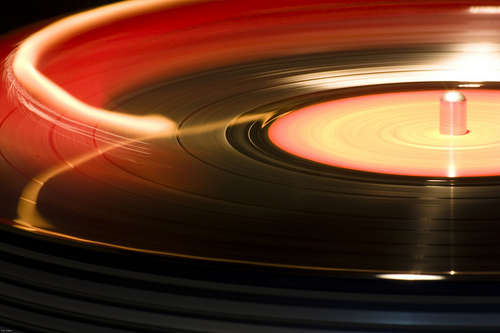
The sound of decadence
Creative Commons License photo credit: Ivan Zuber

If you have Windows installed on your PC, you may have noticed one surprising thing: File copying is amazingly slower than what it was in previous editions of Windows or on other kinds of computers. The exact reason is a bit unclear (some say that it is linked to some Digital Rights Management features kicking in any time you copy a file, but this is still unproven to my knowledge) but this became a very annoying issue for people who have to copy either lots of files (backing up your daily work is a good example – by the way, did you make your daily backup yet?) or some very big files (moving video files around your computer is the archetypal example).

This situation led to the appearance of a few optimize file copy utilities (a software category that did not exist a few years ago, but a useful one). Let’s look at 4 of them which have the enormous advantage of being completely free:

  • SuperCopier: Its strong advantage is that -after installation- it replaces completely the default Windows copy for drag-and-drop (it works nearly without thinking about it)
  • FastCopy is fast but forgets mostly about being beautiful. However, it has a few interesting (and unique) options to configure the way the right-click menu appears.
  • RichCopy is the internal Microsoft solution to their own bug/issue. Amazingly configurable, you can setup profiles for different uses (probably too much for most users, though) but I couldn’t find how to insert it in the right-click menu.
  • CopyHandler: You can’t get more technical than this one! Options include things as obscure as buffer size depending on the type of file copy you do (disk-to-disk, directory-to-directory, disk-to-CD/DVD, etc.) The best little gems here include the possibility to pause/restart file copying, shutting down the computer at the end of a copy session, or scheduling a copy session for the next login.

All of them get rid of the usual flying folder kind of window and replace it with a more technical-looking window with progress bars and more optional lists of details.

Anyway, even if I can recommend all of them (a little preference for SuperCopier), remember that they are not even useful (in terms of copying speed) in Windows XP or Windows 2000. But, if you are using Windows Vista (mostly) or Windows 7, you should seriously consider them.

Planetary pictures and wallpapers

(Saturday, July 11th, 2009)

I consider that the most useful and often the most interesting wallpapers for your computer desktop are images that are relatively feature-less. A picture full of little details continuously grabbing your attention is a major nuisance. It’s much better to have either a very smooth image or a photo containing a lot of continuous tones.

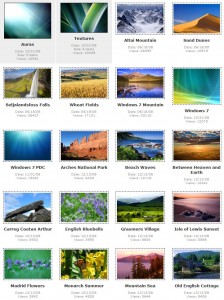
Windows 7 official wallpapers

Windows 7 official wallpapers

Look at the full set of the Windows 7 wallpapers. This is the upcoming version of Windows (after Windows Vista, it seems that Microsoft intends to switch back to a numbering scheme). Most of them may be colourful, but with very smooth surfaces where your icons will be appearing quite neatly and they offer a nice contrast.

Fresh Impact Crater Formed between February 2005 and July 2005 / Credit: NASA/JPL/University of Arizona

Fresh Impact Crater Formed between February 2005 and July 2005
Credit: NASA/JPL/University of Arizona

So, I was quite interested when I stumbled upon the collection of pictures taken by the HiRise (High Resolution Imaging Science Experiment camera installed on board the Mars Reconnaissance Orbiter). Shooting photos of Mars surface, this photo camera brings extraordinary color images that provide nice patterns to be used as background for your Windows desktop (or even Linux or Mac desktop) and can be renewed quite regularly: Their catalog is available on the University of Arizona web site.

Furthermore, they provide an enormous resolution for their images which is a very good way to extract any size you may need for your extra-high-resolution background or to cover your 2- or 3-LCD display. Or even more. If you feel that there own selection of wallpapers is not enough:

  • 800×600
  • 1024×768
  • 1152×864
  • 1280×960
  • 1440×1080
  • 1600×1200
  • 1920×1440
  • 2048×1536
  • 2560×1600

You can still stick to the original size (JPEG-2000 format images range between 0.5GB and 3GB).

And the good news is that there is no copyright restrictions, so you could do pretty much what you want with them: Really free desktop wallpapers.

Compuserve is dead, for real!

(Thursday, July 9th, 2009 by Yves)

We had forgotten that it existed, but this major pioneer of the modem age of computer communication, Compuserve, has now officially closed its doors. It had been trampled by AOL before loosing ground in front of the Internet explosion. But, now, there is nothing left of the communication service we (I) used to exchange information before SPAM could happen, when speeds were measured in bauds.

The DTB saws cameras in half

(Wednesday, July 8th, 2009)

The Deutsches Technikmuseum Berlin is a museum presenting a large mount of technology history. Quite naturally, they are biased toward presenting a lot of German achievements and this country is known for hosting some of the very best optical engineers and being rightfully proud of brands like Carl Zeiss, Leitz/Leica.

Charlie Sorrel wrote a piece of article for Wired.com, titled “Gallery of Sawn-In-Half Cameras” that I intensely recommend reading.


IMG_2616.jpg
IMG_2584.jpg

(more…)

Free video player: VLC is out of beta

(Tuesday, July 7th, 2009)

Simply the best video player for Windows, VLC, just quit its long beta phase. This is official now, VLC v1.0.0 is available with a list of small improvements brought to an already impressive product that I can only recommend if you are using video (to read DVD, BluRay, HD-DVD discs; to stream videos from your computer; to convert your videos; and I sure forget some).

Download VLC

vlc1

100 public libraries on Internet

(Sunday, July 5th, 2009)

CollegeDegree.com lists 100 Extensive University Libraries from Around the World that Anyone Can Access.

Knowledge is always free.

DDR3 memory set to rise

(Thursday, July 2nd, 2009)

It had been quite some time that I did not comment price variations of electronic components. It was easy and acceptable: Everybody could observe the slow price fall under the pressure of recession. But there is a change worth mentioning (and not only the stabilization of LCD prices): DDR3-type of DRAM memory should see a significant price rise during July 2009. According to DRamExchange, we could also expect a 30% hike by the year’s end.

Those elements resulting from the observation of long-term markets and futures, they have quite good reliability. But if the recession does not seem ready to end, why this move up? As a matter of fact, memory buyers are probably preparing themselves for the arrival of the new Windows 7 and its unavoidable additional resource demands. Furthermore, while many processors (specially from AMD, but not only) may be using DDR3 memory but also older DDR2 with no perceivable performance loss, the transition from DDR2 to DDR3 is slowly happening. And this is pushing DDR3 quantities up.

So, if you have a clear need today, I would recommend you to buy your DDR3 memory now. But if you think that you can use DDR2 memory (if you have to ask, that’s your situation), you’d better wait for the relative price slowdown that will be happening on DDR2.

Doom triple pack: Doom, Hexen, Heretic

(Wednesday, July 1st, 2009)

They were the FPS games of your youth (if you are as old as I am): Doom, Heretic and Hexen are three games where you killed, maimed, crushed, punched and powdered thousands of monsters and all kinds of adversaries. Did you know that you could play all three of them on line?

Point your browser to the Doom Triple Pack.

On-line Doom + Hexen + Heretic

On-line Doom + Hexen + Heretic


http://www.roumazeilles.net/

Copyright (c) 1999-2010 - Yves Roumazeilles (all rights reserved)

Template: 28-aug-10

Search provided by Google.com
Roumazeilles.net
Roumazeilles.net