Tag: Linux
-
Less keyboard, more work
We do so much typing that we tend to forget about it. But there are ways to improve the situation (ensuring that you type less to produce more text).one of the best ways is to identify the texts you keep typing on the keyboard. then, you just have to use a utility program to help…
-
OpenOffice.org v3.2 available for free download
The excellent office desktop suite, OpenOffice.org (Word, Excel and PowerPoint, in a free form, if you want) just moved to version 3.2 (still free). New features: Faster start-up times Compatibility with MS-Office 2007 documents Better Compatibility with MS-Office 97, 2000, XP documents, encrypted with a password Importation of dynamic tables from Excel Comments are now…
-
Cygnus for Windows 7
The Cygnus name will certainly remind you of something ig you are interested into GNU/Linux, but maybe not more. Actually, this is a software package which has been designed to provide a lot of the “basic” Linux commands to be used from inside a Command-Line box of Windows. Version 1.7 of Cygnus is now available…
-
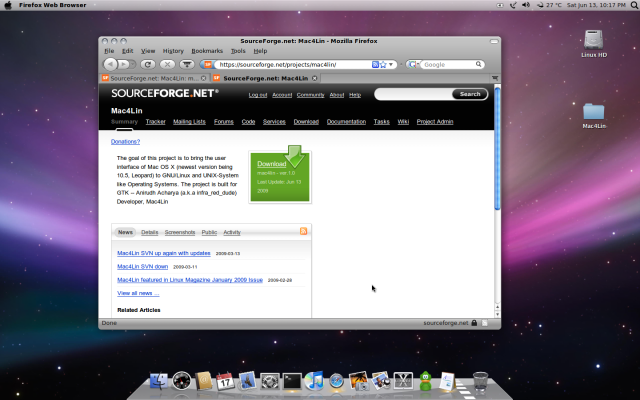
Give your Linux a Mac look
Mac4Lin v1.0 is a free download for Linux systems which will allow your machine to appear very similar to a recent Mac.
-
User manual of OpenLDAP
A good bookmark: Using OpenLDAP on Debian Woody to serve Linux and Samba Users is a user manual for OpenLDAP; But it does a lot more than merely explaining the installation of this directory on Debian Linux. It can be considered as a proper training to OpenLDAP in more ways than one. But if you…
-
Open the bottle for Wine 1.0
After years of preparation and beta-phase, finally, Wine has been able to reach launch as Wine 1.0. Why is it significant? Because this is the software package designed to be able to run many Windows applications from a GNU/Linux distribution. If you want to switch to Linux, you may not be willing to abandon some…
-
Wine is coming to Linux
Usually, I would not comment about upcoming software applications and tools, but today there is an rumour that may be very important. We all know that switching from Windows to Linux is a difficult move because we have been used to so many applications available on one Operating System but not on the other (in…
-
Software galore
We never can get enough of them, but our computers are sometimes overflowing. Software applications are everywhere, but how to choose the right one for the task at hand? I built a real collection of pages where you will be able to find nearly all you can dream for nearly all computers: Five important security…
-
Recompiling a Linux kernel, tips
Some GNU/Linux lovers like to optimize their Linux kernel with many recompilations. This is not absolutely needed, but a quite common hobby there. However, it is quite difficult to do correctly. Tips for successful Kernel Recompilation in Linux by bobcares.com.