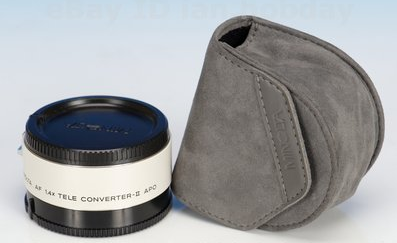
I’m just out of eBay where I bought a second-hand Minolta 1.4x lens converter to extend a little my tele-lenses when I put them on my Sony Alpha 700 and the old faithful Konica-Minolta Dynax Maxxum 7D.
I think it is going to support me when I go to Nepal (Bardia National Park) in next October. With Alain Pons and Amawanda.
2009 starts with some new equipment in Roumazeilles.net home:
An HP LaserJet 1005. The lowest B&W laser I could find at HP (I am faithful to this brand even if the last LaserJet 1022 failed suddenly far before the end of its normal useful life). It’s a Windows-based printer used on the local network, but it seems that printing over the LAN is nearly instantaneous. Magic!
An Epson Stylus Photo R1900. Replacing an eon-old Stylus Photo 750, it should bring color photo printing in A3+. It’s amazingly silent.
Newsrooms are full of weird coincidences. For example, we just learned that  two products often presented as direct competition were launched this Fall. To my right, here is Adobe with its boxing champion, Photoshop, loaded up to version CS4. To my left, Linux and its community of free developpers pushing the challenger on the ring, version 2.6 of The Gimp.
I am still convinced that this is not an even fight (and Photoshop is favored by bookmakers, for those still doubting it) but both announces are interesting and should be reviewed shortly.
Photoshop CS4 is a new step forward based on the award-winning user interface that made it a best seller and on top-level performance. To this market reference product, Adobe adds the following image-edition-oriented features:
Accelerated computation using the modern graphic cards coprocessor and the Windows 64 features (when available, of course), and many tools needed to support a 3rd dimension in graphics design (painting on top of 3Dmodels, 3D compositing, etc.)
Several new tools
Adobe Camera Raw v5 is improved again to include complementary tools applicabel to RAW photo files (local editing, gradual correction filters, etc.)
Bridge CS4 is notably accelerated
The Gimp 2.6
On the other side, The Gimp is now available as version 2.6. Here again, improvements are notable, even if a little smaller:
A number of improvements to the user interface (but I still thing that this is the weak point of this software program; Recommendation: Look into GimpShop which is a hack to The Gimp in order to make it appear similar to Photoshop)
Improvements to the selection tool
Improvements to the drawing brush
32-bit GEGL data management (perfectly adapted to keep maximum quality in 12- and 14-bit RAW files)
All this will probably start again comment wars supporting one or the other solution. But remember that The Gimp is simply free. On the contrary, Photoshop CS4 (even if getting the upgrade license and despite the many available options) will still be very expensive (Master Collection at $2,499).
Here is an interesting case (I think) of how I work on the photos I shot. Usually, I think of it as development of the digital image. Like for its argentic/analog counter-part, I have to work a little on the image to make it printable, but I also have to prepare a correct framing of the image and possibly more.
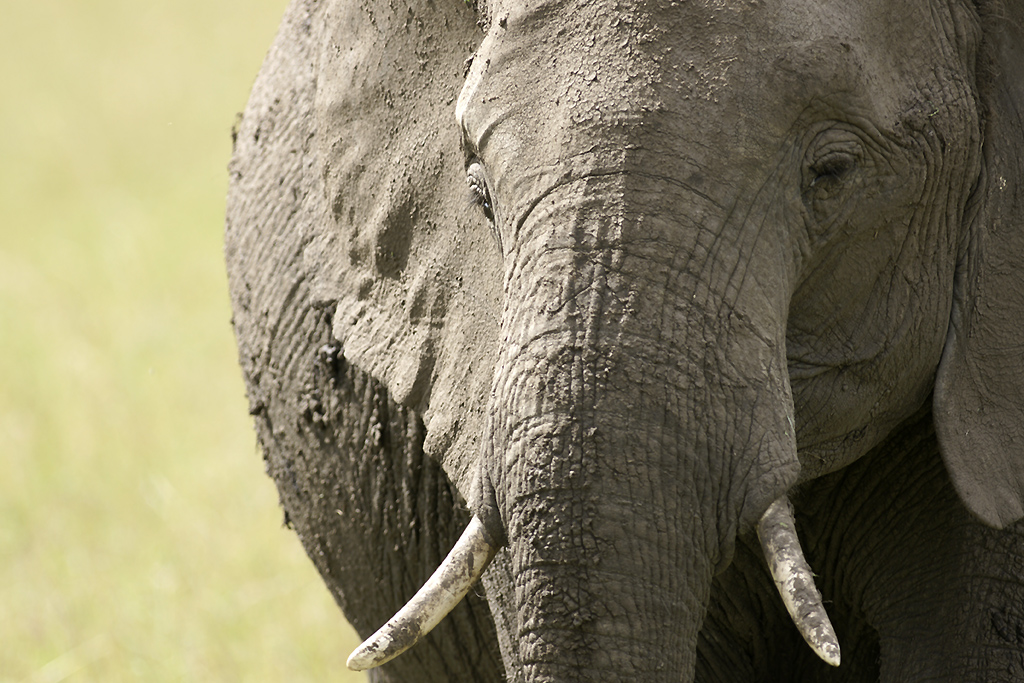
This is the photo of an elephant on the Musiara plains of the Masai Mara National Park in Kenya. Initially, I shot the horizontal photo below, in order to get a fairly good portrait of an elephant within a tight frame:
It is a fairly correct image: A touch of colour in the background, enough information in both highlights and shadows, good focus plane, nice structure on the skin of the elephant, both eyes are visible and both tusks are inside the frame.
But after preparing/developping the trivial image (just minor levels correction, minimal unsharp mask), I thougt that it could be possible to try something else by re-framing the image:
But while I was at it (and because of the nice work of light on the mud-covered skin of the animal), I also decided to try a black and white presentation (with desaturation by Photoshop and a little coloring of the image):
On the Canon USA web site, there are a few interesting articles about the recent Canon EOS 50D. A good way to evaluate the performance we all can expect from this nice camera for enthusiasts.
And remember that Full Frame cameras are for the richest of the photographers. Most of us are still interested in more accessible real-world cameras like the Canon EOS 50D.
Even shooting the photos seemed out-this-world: Silently and slowly walking the station with another photographer (we did not even exchange a word), while the people around us were waiting for their train trying not to notice the flash lights. It could not have been a more troubling experience, going from an unstuck paper to a poor paint job or a hasty writing between dirty white tiles.
After some interesting comments seen about the age of the current EF 100-400 f/4-5.6L IS tele-zoom from Canon (for example, in the recent test done by Chasseur d’Images), there is now an active rumour about the arrival of a real replacement.
The Canon EF 100-400 f/4-5.6L IS II would no longer be a push-pull design but would have a second ring (like the recently presented Sony design). Better for managing the sealing and protection that are so important when used in difficult conditions like a photo-safari. It would also be equipped with an upgraded image stabilizer (the most critical issue with the existing zoom).
Expect a price of US$1700. If that one is true, it will be a very good price.
Announcement: Not sure, but you can bet there would be something about it on September 17th when Canon will present its new SLR body.
We were waiting for it, we were speaking about it, we were murmuring. Here it comes. Sony just let some information leak about their new super-tele-lens to complete an already rather rich list of good quality lenses:
The Sony 70-400mm f/4-5.6 G SSM is described in the PDF documentation of the Sony 70-300mm f/4-5.6 G SSM. Obviously, they were designed together. It is a twist-zoom. This will differentiate quite notably from the push-pull type of others like the Canon 100-400mm and it should protect it efficiently against dust entry (and we know that this is the bane of push-pulls.
The technical features can be read from this table. I can imediately notice that the diaphragm is staying between f/4 and f/5.6 (the golden standard of this type of zoom), that the weight is rather high (heavier than the Nikon and the Canon, nearly as much as the Sigma equivalnet) and that the minimum focus distance is very competitive.
Let’s wait for images and tests (and the price), but this could be the ideal lens to go and shoot in a wild-life safari.
This is right that many people feel obliged to use Photoshop to manage their photo images. But in most cases, nearly any other tool would be as good. I think first about the excellent IrfanView which is free and does a lot of digital photo management.
But it is also true that if you really want to use all of the xtensive feature set of Photoshop or if you appreaciate its rich interface (defintely well-thought with the user in mind), The Gimp will not be enough for your photographer needs. Here comes the a really surprising software program: Pixlr.
It essentially took the Photoshop interface ideas (really VERY similar to Photoshop), it is a software application written by Ola Sevandersson to be used online (but still in beta status). Nothing to download, free (as in free beer), legal, operating damn well.
What is also notable is that it is available with an interface customized in different languages (including English, of course, and 10 others.
OK! I don’t really know what it will be but one of the web sites I regularly check (Photoshop Insider) announced a bizarre event: WorldWide PhotoWalk. The idea is just to have photographers going to a place to walk together in a town they know in order to shoot a few pictures and… share.
This afternoon, I decided to go to the Photowalk in Paris tomorrow morning (if I wake up early enough to be there by 10am).
I known this is a last-minute decision, but if you’re in Paris, why not join? It’s free.
Two articles written exactly for photographers willing to improve their flash expertise. I found them on the Internet and wanted to share them with you, photo friends.
Natural looking flash. Right! It may be very difficult to get a nice looking lighting without burning everything with lights that cry “flash”.
White Seamless Tutorial. A 5-part article of an exceptionnal quality/expertise but perfectly understandable by anybody willing to get a good studio lighting with a limited budget to have white backgrounds as well as black ones, grey ones, colored ones, with perfect mastering of the result. Really brillant!
For sure, we can find information of the highest quality on the Internet.
What I do (or should be doing, since -like everybody else- I can’t stick to my good resolutions) in order to obtain beautifully detailled photographs. It’s even more important if you want to make them ready for printing in large size (on your brand new A3 inkjet printer or poster-size at a print shop).
A quality lens
The first advice I should give it to choose a high-end lens. Even if the trans-standard zoom lens of the kit for most digital SLR cameras provide very good results in an exceptionnally compact form factor, that we all love to use. But these are also the result of so many compromises where image quality cannot be always the only factor.
Professionnal zoom lenses (the most expensive) are often capable of really impressive achievements, but prime lenses (with a fixed focal lenght) can reach quality levels that no zoom lens can reach. Some say that this is their unique (and only) selling point: Quality.
Thus, in the Minolta-Sony lens catalog, I rushed onto the white tele-lenses from the APO G pro family that, even today, produce exceptionnally good images (for a price no less astonishing if you don’t purchase them second-hand). But each serious camera/lens manufacturer has a few very nice lenses in its catalog.
I have collected a few posts at LifeHacker that I wanted to share with you because they are concentrating on some easy and powerful techniques to be used with Photoshop.
Several times, I talked about the limitation to photo image quality by light diffraction but I failed to go into the details. To the general request of one reader who asked, I will try to give some explanations to better understand why the digital photographer must absolutely take that into account to make better pictures and to choose its camera.
The first thing to know is that light diffraction is a very general phenomenon and quite natural. It’s been a long time already that scientists and engineers noticed that -on the one hand- light rays are slightly deflected while running through a very small orifice and -on the other hand- two light rays can interact with each other on the condition that they are have very paths nearly perfectly parallel. This is even one of the most significant and founding elements of quantum physics. When you combine both those phenomenons, you will notice that light going through a very small opening like camera lens diaphragm will produce not exactly the expected neat circle but a more irregular and circular shape that you can see in the illustrative figure that goes along this paragraph: Usually named an Airy disk or Airy disc.
I don’t intend to go too deep into this kind of extreme photography right now, but I wanted to indicate two news items that could be reflecting on the continuous trend toward larger sensors and additional pixels:
Are you looking for information and news about digital
photogaphy and digital SLR cameras?
They are now grouped again in my new web site YLovePhoto.com.