(Monday, September 1st, 2008)
This is right that many people feel obliged to use Photoshop to manage their photo images. But in most cases, nearly any other tool would be as good. I think first about the excellent IrfanView which is free and does a lot of digital photo management.
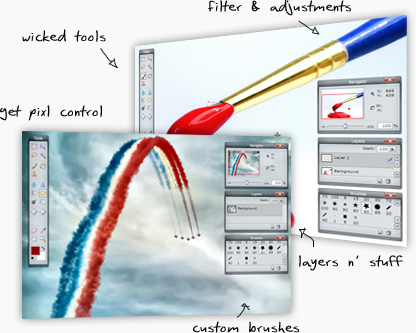
But it is also true that if you really want to use all of the xtensive feature set of Photoshop or if you appreaciate its rich interface (defintely well-thought with the user in mind), The Gimp will not be enough for your photographer needs. Here comes the a really surprising software program: Pixlr.
It essentially took the Photoshop interface ideas (really VERY similar to Photoshop), it is a software application written by Ola Sevandersson to be used online (but still in beta status). Nothing to download, free (as in free beer), legal, operating damn well.
What is also notable is that it is available with an interface customized in different languages (including English, of course, and 10 others).
Totally approved.
Find more stories in Legal downloads, Photo & Graphics, Use your D-SLR, Web sightings. Tags:
(Saturday, August 23rd, 2008)
OK! I don’t really know what it will be but one of the web sites I regularly check (Photoshop Insider) announced a bizarre event: WorldWide PhotoWalk. The idea is just to have photographers going to a place to walk together in a town they know in order to shoot a few pictures and… share.
This afternoon, I decided to go to the Photowalk in Paris tomorrow morning (if I wake up early enough to be there by 10am).
I known this is a last-minute decision, but if you’re in Paris, why not join? It’s free.

Find more stories in Art, Culture, Entertainment, Photo, Use your D-SLR. Tags:
(Friday, August 15th, 2008)
Two articles written exactly for photographers willing to improve their flash expertise. I found them on the Internet and wanted to share them with you, photo friends.

- Natural looking flash. Right! It may be very difficult to get a nice looking lighting without burning everything with lights that cry “flash”.
- White Seamless Tutorial. A 5-part article of an exceptionnal quality/expertise but perfectly understandable by anybody willing to get a good studio lighting with a limited budget to have white backgrounds as well as black ones, grey ones, colored ones, with perfect mastering of the result. Really brillant!
For sure, we can find information of the highest quality on the Internet.
Find more stories in Use your D-SLR. Tags: Flash, lighting, Photo
(Friday, August 8th, 2008)
What I do (or should be doing, since -like everybody else- I can’t stick to my good resolutions) in order to obtain beautifully detailled photographs. It’s even more important if you want to make them ready for printing in large size (on your brand new A3 inkjet printer or poster-size at a print shop).
A quality lens
The first advice I should give it to choose a high-end lens. Even if the trans-standard zoom lens of the kit for most digital SLR cameras provide very good results in an exceptionnally compact form factor, that we all love to use. But these are also the result of so many compromises where image quality cannot be always the only factor.
Professionnal zoom lenses (the most expensive) are often capable of really impressive achievements, but prime lenses (with a fixed focal lenght) can reach quality levels that no zoom lens can reach. Some say that this is their unique (and only) selling point: Quality.
Thus, in the Minolta-Sony lens catalog, I rushed onto the white tele-lenses from the APO G pro family that, even today, produce exceptionnally good images (for a price no less astonishing if you don’t purchase them second-hand). But each serious camera/lens manufacturer has a few very nice lenses in its catalog.
(more…)
Find more stories in Art, Inkjet, Photo, Photo & Graphics, Use your D-SLR. Tags: Photo, tips
(Monday, August 4th, 2008)
I have collected a few posts at LifeHacker that I wanted to share with you because they are concentrating on some easy and powerful techniques to be used with Photoshop.
Find more stories in Photo & Graphics, Use your D-SLR. Tags: Photoshop, tips, tricks
(Monday, July 21st, 2008)
Several times, I talked about the limitation to photo image quality by light diffraction but I failed to go into the details. To the general request of one reader who asked, I will try to give some explanations to better understand why the digital photographer must absolutely take that into account to make better pictures and to choose its camera.
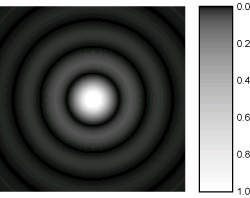
The first thing to know is that light diffraction is a very general phenomenon and quite natural. It’s been a long time already that scientists and engineers noticed that -on the one hand- light rays are slightly deflected while running through a very small orifice and -on the other hand- two light rays can interact with each other on the condition that they are have very paths nearly perfectly parallel. This is even one of the most significant and founding elements of quantum physics. When you combine both those phenomenons, you will notice that light going through a very small opening like camera lens diaphragm will produce not exactly the expected neat circle but a more irregular and circular shape that you can see in the illustrative figure that goes along this paragraph: Usually named an Airy disk or Airy disc.
(more…)
Find more stories in Buy a D-SLR, Photo & Graphics, Record images, Sciences, Tech, Use your D-SLR. Tags: diffraction, digital, full-frame, Photo, pixel
(Tuesday, July 8th, 2008)
I don’t intend to go too deep into this kind of extreme photography right now, but I wanted to indicate two news items that could be reflecting on the continuous trend toward larger sensors and additional pixels:
Again, those people are keeping pixel size around 6µm (a good target to keep diffraction low and manageable).
Find more stories in Buy a D-SLR, Tech, Use your D-SLR. Tags:
(Monday, June 30th, 2008)
I assume that the lens choice was not the right one. Unfortunately, I could not find the author of this image.
Find more stories in Birds, Photo safari, Use your D-SLR. Tags: bird, lens, tele
(Monday, June 23rd, 2008)
With all this talk about existing Full-Frame photo cameras (Canon EOS 5D, Nikon D3) and about possibly upcoming new ones (Sony Alpha 900, Canon EOS 5D Mk II or some other similar name, etc.) many photographers happy with their existing digital equipment are wondering: “What’s all the fuss about?”
And it’s a good question to ask, but the answer goes with some of the comments about sensor resolution. About the same people who noticed that resolution is not all that counts (despite what is said or implied by some of the major brands on this market) also understand that going Full Frame is a possibly very important decision for the attentive digital photographer.
(more…)
Find more stories in Canon EOS 5D Mk II, Canon EOS 6D, Canon EOS 7D, Nikon D3x, Pentax, Photo, Samsung, Sony Alpha 900, Tech, Use your D-SLR. Tags: digital, DSLR, full-frame, reflex, SLR, technique, technology
(Friday, May 30th, 2008)
When you have a web site, it becomes quite common that some people feel so easy to just borrow your images that they do not even take the time to make a copy on their own web site. Not only do they use your artwork, but they also use the bandwidth you paid for.
Normally, there is a solution. You can modify slightly your website to ensure that if this happens, the image served is not the original one, but a modified one (either a big red X, or a message to the reader). But it is a little difficult to do by hand. A wbe site tool comes handy for this: HTMLbasix – Htaccess Disable Hotlinking Code Generator.
Find more stories in Art, Blog, HTML and CSS, Internet, Liberties, Photo, Photo & Graphics, Security, Use your D-SLR, Web sightings. Tags: Apache, automatic, code, generator, hot link, hotlinking, htaccess, image, steal, web site