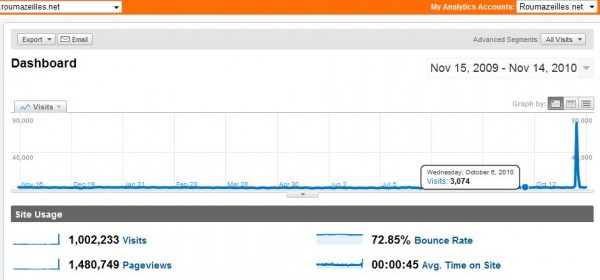
Nobody reads my blog…
(Tuesday, January 20th, 2009)
(Saturday, January 10th, 2009)
If you want to build a web site, or a better web site, I am starting a series of short small ideas about how to improve a web site or a blog with small tasks. One idea, one improvement per week. This is in the “easy idea” category of my other web site: Y Want Visits.
This is time to start your own blog in order to earn some revenue protecting you against the current recession.
(Sunday, December 28th, 2008)
You should protect your computer when navigating on the Internet. However, Microsoft would have you thinking that the embedded firewall provided by Windows is good enough. Actually, there is much better software to replace it. And not everything is expensive:
Recommended from LifeHacker [Hive Five].
(Friday, December 26th, 2008)
For sure, YouTube has always been crouded with rip-offs of the Monty Python sketches. Unfortunately, these were both illegal and -in general- of poor quality. The guys from Monty Python decided that enough is enough, and there is now a Monty Python channel/group on YouTube where you can see excellent quality videos of their Monty Python’s Flying Circus.
(Sunday, November 9th, 2008)
This is what I told myself when uncovering a little PHP code fragment that stopped working on one of my web sites. So, this is a reminder for those of you inattentive programmers like me: $DOCUMENT_ROOT = $HTTP_SERVER_VARS['DOCUMENT_ROOT']; is deprecated and works no longer. You must now use the newest form: $DOCUMENT_ROOT = $_SERVER['DOCUMENT_ROOT'];.
Be warned.
(Sunday, November 2nd, 2008)
I am quite found of any tool that allow to search inside the contents of images on the web. One such tool is Multicolr Search Lab Flickr set. I really like it because it is able to look for images based on their colors. But not only that. Today they include a lot more images since they collected 10 millions Creative Commons images from Flickr.com.
It was an impressive tool, it’s now a useful tool.
(Sunday, October 12th, 2008)
If you have the heart of an adventurer, you may be interested to know that Ijust put in beta-test some new websites that I am working on.
Your opinion will be welcome, but -remember- this is beta-test. So, it is full of bugs, problems, issues and don’t come back and complain if your significant other dumps you because of it.
Note: Most (if not all) of the photo-related news here will be applied to YLovePhoto.com as soon as I feel free with this new web site.
(Friday, September 5th, 2008)
I migrated this web site to the latest version of WordPress (version 2.6). Since this is a significant jump from the old v2.3.3 that I was still using (because it was stable and without known bugs), I feel that it could be interesting to summarize the observations I made during this migration.
I have no difficulty working with WordPress 2.6 now. Even if a few things keep annoying me and I feel that it was not all change-for-the-best, I would easily recommend it (even the newest v2.6.1).
(Thursday, September 4th, 2008)

Google Chrome
How could we ignore the launch of Chrome, the new browser from Google? Every is babbling about it, everybody tried it (it can be downloaded here).
But after one test run, I believe that I should explain something. Yes, this is a marvellous browser because it takes most of the good things from FireFox, Opera or Safari (all IE competition). I immediately noticed:
Some will also have noticed the more technical features like:
But, all this is hiding a very critical reality: Google did not even try to make a mere browser (it even lacks a simple RSS feed manager). They are more interested in doing more than Internet Explorer competiton. Much more.

Chrome (tasks)
The impressive advantage of this browser is elsewhere: it will fight against Microsoft applications allowing to work online in the best possible conditions. Chrome is nearly an Operating System competing with Windows. Yes, because where Windows offered a vehicle to sell Microsoft Office, Chrome will allow Google to develop a wider range of online tools in the path opened by the Desktop applications and GMail.
It will hurt Microsoft real bad. Chrome is obviously the best browser to support this approach. Rock solide, fast (very), reliable and able to support application crashes.
(Friday, August 29th, 2008)
Minor information about using WordPress v2.6 (the latest revison of this great blog/web-site-wrinting tool).
I had a few difficulties to ensure that images where correctly aligned and displayed after the improvements in their presentation in WP2.6. For those really interested, I ended up adding the following to my CSS file:
Thanks to the support of the WordPress.org forum.
(Tuesday, July 29th, 2008)
The newest fad about search engines is Cuil (say “cool”). It’s been created by people from Google and is set to replace Google (or is it?)
I tried it and I could not think of a reason to use it. The biggest problem is that it does not find anything useful. I may be a little egocentric, but I tried my name and I could not even find the roumazeilles.net web site in the first results. I know that a search engine is not supposed to replace typing correctly addresses, but I did not expect to find page after page of results pointing to ***old*** pages relating to my software development of 5 years ago. All these pages where not updated in the last half-decade… They are pretty much redundant and contain a lot of crap around download links.
The most regular web sites I work for, the papers I signed where really difficult to find in the stack of results while they are supposed to be the most pertinent information concerning my (not-so) important little person.
Furthermore, I learned that the servers crashed several times during the first day of operation.
I’d say: wait for the next implementation and stick to Google.
(Friday, June 13th, 2008)
As you certainly already know if you follow regularly this web site, the Internet addresses will soon be depleted (all used). The end of the Internet world as we know it should be reached around 2011 or 2012. That is the reason why some companies are working to push out the most common Internet protocol (IPv4) and to make space for its successor (IPv6).
This is why, while the Internet Engineering Task Force (IETF) was preparing a night without IPv4 to reach the largest possible public, Google launched a version of its search engine reserved to IPv6: ipv6.google.com (If you are like almost everybody, you will not see anything at the end of the link).
Now, we all have to switch as soon as possible.
(Tuesday, June 10th, 2008)
…with this long list of proxies (unfortunately, some or many of them may not work for all people).
(Friday, May 30th, 2008)
When you have a web site, it becomes quite common that some people feel so easy to just borrow your images that they do not even take the time to make a copy on their own web site. Not only do they use your artwork, but they also use the bandwidth you paid for.
Normally, there is a solution. You can modify slightly your website to ensure that if this happens, the image served is not the original one, but a modified one (either a big red X, or a message to the reader). But it is a little difficult to do by hand. A wbe site tool comes handy for this: HTMLbasix – Htaccess Disable Hotlinking Code Generator.
(Saturday, May 10th, 2008)
While everybody is speaking about downloads under surveillance of law enforcement forces and **AA groups defending the copyrights of music and cinema, I wondered where the download addicts were going now to get their load of big files.
I looked into the P2P networks heavily protected by a strong encryption and supposed to guarantee the anonymity of their uses (often named darknets). this claim seems to be well defended, but the available contents are limited and strongly influenced by the fight for liberties (and sometimes against the most paranoid conspirations) and very marginal behaviours (pedophily is really more present there than in the more common Internet you and me use everyday).
But I was also directed toward the Usenet newsgroups. It is clear that a large number of users are living a free life far from the preening eyes of most external observers. As a matter of fact, if you download from your ISP’s news server, the data flow is only visible by yor ISP and yourself. Nothing goes into the open Internet. Of course, some ISP decided to limit access to some of the newsgroups, but choice is still quite large and your tranquility is much more preserved than on a P2P network (and less than on a fully anonymous darknet).
What tools do you need to browse the newsgroups? A little more technical attention than on the simplest P2P networks, for sure. But the tools are relatively easy to find:
A Usenet reader able to correctly read the posts containing attached file. You have to remember that more of these files are actually cut in parts, attached one by one to different posts and encoded using standard but very specific protocols. The most convincing free tool -for me- was Grabit for Windows that seems able to decode nearly anything, grabbing parts from different messages and sticking them together in files or directories. Most important, it understands how to work with *.NZB files that describe all the parts, all their locations, etc. for one attached file set.*.PAR2 files that allow to run around the transmission errors (with the help of one sophisticated encoding, they can compensate for missing data or corrupted data, etc.) Here, I prefered QuickPar for Windows, one more free tool.Note: Normally, Grabit doe sit all, but QuickPar for Windows still comes handy in case of failure.
The most impressive part of my tests has been download performance. 13 Mbit/s, I did not see this for a long time. The more because it was sustained for days (it goes down a little because of minor trafic jams at my ISP in the evening).
But you have to notice that if you look for a specific data content, newsgroups are not helping you. The way they are organized is favoring a lot the exploitation of very young content. If newsgroup search engines exist (Grabit has one that is partially submitted to subscriptions), the Usenet system will only host young data or data recently published.
(Saturday, April 12th, 2008)
Some people have been telling me: “You blog! That must take a lot of time and you must be there each and every day”.
Don’t worry, I may post something on Roumazeilles.net every day, but it does not mean that I am in front of the keyboard every day. Far from it. I am using one small advantage of WordPress (the software package supporting my web site). I can write posts and schedule them for future publication.
That way, I have no limit to my inspiration. For example, I have currently scheduled weekly posts about optical illusions for the coming 6 months, a full week of feline-related news (daily posts next week), a full week of daily videos titled “when XXXXX get bored” in a couple of months.
(Thursday, April 10th, 2008)
I noticed two important announcements for airline passengers. Things will be changing in terms of accepting new technologies useful for most international frequent flyers:
Surprising? Not really. We know for a long that there is no technical problem, just nobody was willing to try (in the airline companies and the public authorities).
Copyright (c) 1999-2009 - Yves Roumazeilles (all rights reserved)
Latest update: 8-sep-09